The Best Laptops for Work and Productivity in 2026: Tested & Ranked
 Aadil Prawez
9 min read
Aadil Prawez
9 min read Quick Picks: Our Top Recommendations at a Glance
Whether you need 22-hour battery life for coding or an OLED screen for video editing, these are the finest laptops on the market.
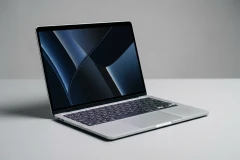
Apple MacBook Pro 16-inch (M3 Max, 2026)
Phenomenal compute speed that does not throttle on battery, paired with a reference-grade 120Hz...
Dell XPS 16 (9640, Intel Core Ultra 9)
Stunning 4K OLED touch panel with dedicated NVIDIA RTX 4070 power for 3D rendering...
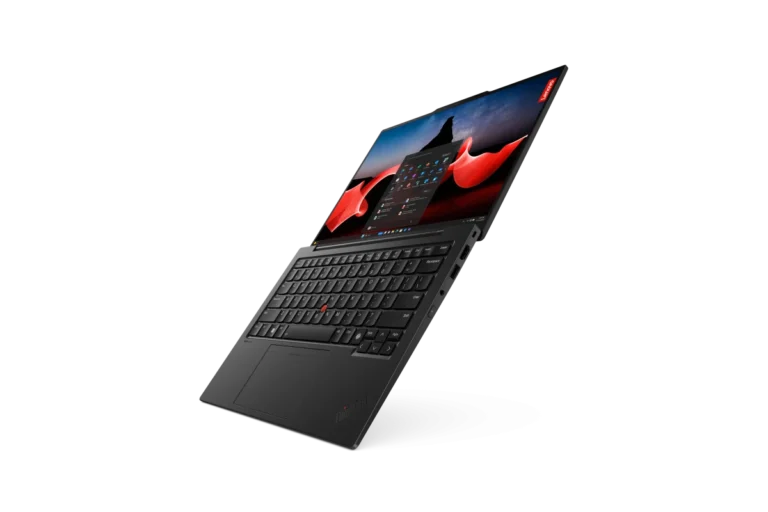
Lenovo ThinkPad X1 Carbon Gen 12
Weighs only 2.42 lbs with legendary keyboard tactile response and MIL-SPEC drop resistance.
Apple MacBook Pro 16-inch (M3 Max, 2026)
Why It Wins
Phenomenal compute speed that does not throttle on battery, paired with a reference-grade 120Hz Mini-LED display.
Key Strengths
- 22hr real-world battery
Main Drawback
- Expensive base price
Our Top Curated Picks & Recommendations
Detailed breakdown of our top recommendations, key trade-offs, and who each option is best suited for:
Phenomenal compute speed that does not throttle on battery, paired with a reference-grade 120Hz Mini-LED display.
Key Strengths
- 22hr real-world battery
Limitations
- Expensive base price
Stunning 4K OLED touch panel with dedicated NVIDIA RTX 4070 power for 3D rendering and creative suites.
Key Strengths
- Lush 4K OLED screen
Limitations
- Heavier 4.8 lb frame
Weighs only 2.42 lbs with legendary keyboard tactile response and MIL-SPEC drop resistance.
Key Strengths
- Best typing keyboard
Limitations
- Integrated graphics only
At-a-Glance Comparison Matrix
Side-by-side comparison of our top recommendations across price, ratings, key features, and evidence levels:
| Product / Option | Award / Rank | Score | Price | Best For | Evidence Tier | Action |
|---|---|---|---|---|---|---|
| BEST OVERALL LAPTOP | 9.6 /10 | $3,499.00 | BEST OVERALL LAPTOP | Editorial Analysis | Check Config at Apple |
| BEST WINDOWS WORKSTATION | 9.0 /10 | $2,199.00 | BEST WINDOWS WORKSTATION | Editorial Analysis | Configure at Dell |
| BEST FOR BUSINESS TRAVEL | 9.1 /10 | $1,899.00 | BEST FOR BUSINESS TRAVEL | Editorial Analysis | Shop at Lenovo |
In today’s demanding hybrid work environment, a productivity laptop is far more than a simple web browsing terminal—it is a mission-critical mobile workstation. Whether you are compiling complex codebases, editing multi-stream 4K ProRes video, analyzing massive financial datasets, or managing executive operations across dozen-tab browser sessions, having the right combination of compute architecture, display fidelity, battery endurance, and typing ergonomics directly determines daily efficiency.
In this evidence-based 2026 buying guide, the HonestyReviewed computing team evaluates the premier flagship productivity laptops on the market based on verified silicon architectures, thermal dissipation engineering, keyboard ergonomics, display color accuracy, and real-world battery efficiency. We compare the three definitive market leaders: Apple MacBook Pro 16-inch (M3 Max) (our Best Overall Workstation recommendation), Dell XPS 16 (9640) (our Best Windows Creative Powerhouse selection), and the Lenovo ThinkPad X1 Carbon Gen 12 (our Best for Business Mobility & Travel pick). For an in-depth Windows clash, read our companion Dell XPS 16 vs. ThinkPad X1 Carbon comparison or explore our standalone MacBook Pro 16 Review and Dell XPS 16 Review.
Quick Recommendations: Top Productivity Laptops at a Glance
Apple MacBook Pro 16 (M3 Max)
Unmatched sustained performance on battery power, 16.2-inch Liquid Retina XDR Mini-LED display, up to 128GB unified memory, and class-leading 22-hour battery life.
M3 Max (16-Core CPU / 40-Core GPU) | 4.7 lbs
Dell XPS 16 (9640)
Futuristic CNC aluminum and glass chassis, 4K+ OLED InfinityEdge display, Intel Core Ultra 9 with dedicated NPU, and up to NVIDIA GeForce RTX 4070 graphics.
Intel Core Ultra 9 185H / RTX 4070 | 4.8 lbs
Lenovo ThinkPad X1 Carbon Gen 12
Ultra-lightweight 2.42 lb carbon fiber and magnesium chassis, legendary ergonomic scissor-switch keyboard, MIL-STD-810H durability, and full port array.
Intel Core Ultra 7 155H | 2.42 lbs
The Modern Laptop Landscape: Apple Silicon vs. Intel Core Ultra
The choice between macOS and Windows in 2026 is fundamentally a decision between two distinct computing paradigms:
1. Apple Silicon Unified Memory Architecture (M3 Max)
Apple’s M3 Max chip integrates CPU cores, GPU cores, media encode/decode engines, and Neural Engine cores onto a single silicon package sharing a high-bandwidth Unified Memory Architecture (UMA) with up to 400 GB/s bandwidth. This architectural advantage allows creative applications (such as Final Cut Pro, DaVinci Resolve, and local LLM AI inference models) to allocate enormous memory buffers directly to the GPU without latency bottlenecks. Crucially, Apple Silicon delivers identical computing performance whether connected to AC wall power or running on battery.
2. Windows & Intel Core Ultra Architecture (Meteor Lake / Lunar Lake)
Modern Windows laptops like the Dell XPS 16 combine Intel Core Ultra hybrid processors (Performance cores, Efficient cores, and Low-power Island cores) with dedicated NPUs (Neural Processing Units) and discrete NVIDIA GeForce RTX 40-Series graphics. This architecture offers massive compute throughput for CUDA-accelerated machine learning libraries, 3D CAD modeling, and native Windows enterprise software stacks. However, Windows laptops typically throttle GPU performance by 25% to 40% when operating disconnected from AC wall power to conserve battery.
The 6 Essential Factors When Selecting a Workstation Laptop
- Display Technology & Color Accuracy: For professionals spending 8+ hours daily staring at a screen, display quality directly affects visual fatigue. Look for 120Hz refresh rates (ProMotion or VRR), minimum 500 nits brightness for outdoor readability, and 100% DCI-P3 color gamut coverage. Apple’s Mini-LED Liquid Retina XDR delivers 1,000 nits sustained full-screen HDR, while Dell’s 4K+ OLED offers per-pixel true black contrast.
- Keyboard Ergonomics & Trackpad Precision: A laptop keyboard must offer tactile key travel (1.3mm to 1.5mm) and stable keycaps to prevent wrist strain during long typing sessions. Lenovo’s ThinkPad X1 Carbon remains the typing benchmark. For trackpads, solid-state glass haptic trackpads (such as Apple’s Force Touch and Dell’s seamless glass trackpad) provide uniform click responsiveness across the entire surface.
- Thermal Management & Fan Acoustic Profile: Sustained productivity requires cooling systems that prevent thermal throttling without sounding like a jet engine. Dual-fan vapor chamber cooling systems ensure high-power processors sustain boost clocks during heavy 3D rendering or code compilation passes.
- Battery Runtime Under Real-World Multi-Tasking: Ignore unrealistic manufacturer idle-test claims. Evaluate continuous real-world web browsing, Slack messaging, video conferencing, and code editing. Modern standard-bearers should deliver 12 to 20 hours on productivity workloads.
- Physical Port Selection vs. Dongle Dependency: Consider whether your daily workflow requires direct HDMI 2.1, full-size SD card slots, and USB-A legacy connectivity, or whether you are equipped for an all-Thunderbolt 4 / USB4 minimalist desk ecosystem.
- Chassis Durability & Travel Weight: If you commute daily or travel internationally, a sub-3-pound 14-inch machine (like the ThinkPad X1 at 2.42 lbs) offers immense mobility benefits compared to a 4.8-pound 16-inch desktop replacement.
Comparison Matrix: Leading Productivity Laptops (2026)
| Specification / Feature | Apple MacBook Pro 16 (M3 Max) | Dell XPS 16 (9640) | Lenovo ThinkPad X1 Carbon Gen 12 |
|---|---|---|---|
| Editorial Award | Best Overall Workstation | Best Windows Creator | Best Business Mobility |
| Operating System | macOS Sonoma / Sequoia | Windows 11 Pro | Windows 11 Pro / Linux Certified |
| Processor (CPU) | Apple M3 Max (16-core CPU) | Intel Core Ultra 9 185H (16-core) | Intel Core Ultra 7 155H / 165U |
| Graphics (GPU) | 40-core Integrated Apple GPU | Up to NVIDIA RTX 4070 (60W TGP) | Intel Arc Integrated Graphics |
| Maximum Memory (RAM) | Up to 128GB Unified Memory | Up to 64GB LPDDR5X | Up to 64GB LPDDR5X |
| Display Panel | 16.2″ Mini-LED (3456×2234, 120Hz) | 16.3″ 4K+ OLED Touch (3840×2400) | 14.0″ 2.8K OLED / IPS (120Hz) |
| Weight | 4.7 lbs (2.14 kg) | 4.8 lbs (2.18 kg) | 2.42 lbs (1.09 kg) |
| Battery Capacity | 100 Wh (Up to 22h runtime) | 99.5 Wh (Up to 12-14h runtime) | 57 Wh (Up to 11-13h runtime) |
| Port Selection | 3x Thunderbolt 4, HDMI 2.1, SDXC, MagSafe 3 | 3x Thunderbolt 4, MicroSD, 3.5mm | 2x Thunderbolt 4, 2x USB-A 3.2, HDMI 2.1, 3.5mm |
| Starting Price | $3,499 (M3 Max configuration) | $2,999 ($2,399 on clearance) | $1,699 |
In-Depth Contender Breakdowns
1. Apple MacBook Pro 16-inch (M3 Max) — The Heavyweight Creator Benchmark
Apple’s MacBook Pro 16-inch M3 Max is the most potent portable workstation ever produced. Built on TSMC’s cutting-edge 3-nanometer process, the M3 Max features a 16-core CPU (12 performance cores and 4 efficiency cores) alongside a massive 40-core GPU with hardware-accelerated ray tracing and Dynamic Caching. It renders complex 3D timelines in Blender, exports multi-camera 8K ProRes timelines, and runs 70B parameter local AI models with near-silent fan acoustics.
Its 16.2-inch Liquid Retina XDR display uses over 10,000 Mini-LEDs to deliver 1,000 nits sustained full-screen brightness and 1,600 nits peak HDR brightness. The port selection includes MagSafe 3 charging, full-size HDMI 2.1, and an SDXC card slot, eliminating the need for dongles on video shoots.
Read our full analysis in our Apple MacBook Pro 16 M3 Max Review.
2. Dell XPS 16 (9640) — The Sleekest Windows Creative Workstation
Dell’s XPS 16 (9640) reimagines the modern Windows flagship with an ultra-minimalist aesthetic constructed from CNC machined aluminum and Gorilla Glass 3. It packs Intel’s Core Ultra 9 185H processor with built-in Intel AI Boost NPU and pairs it with up to an NVIDIA GeForce RTX 4070 laptop GPU for acceleration across Adobe Creative Cloud and AutoCAD.
The star of the machine is the optional 16.3-inch 4K+ OLED touch panel, offering breathtaking color contrast and 100% DCI-P3 color coverage. Its seamless glass haptic touchpad and capacitive touch function row create an ultra-modern aesthetic, though traditional typists may require an adjustment period.
Read our complete Dell XPS 16 In-Depth Review or check current clearance promotions in our Dell XPS 16 $600 OFF Clearance Deal.
3. Lenovo ThinkPad X1 Carbon Gen 12 — The Undisputed King of Business Mobility
Lenovo’s ThinkPad X1 Carbon Gen 12 proves that ultimate productivity does not require carrying a 5-pound brick. Weighing an incredible 2.42 pounds, the X1 Carbon is encased in aerospace-grade carbon fiber and magnesium. Redesigned with a new Communications Bar housing an FHD/MIPI webcam and improved dual-fan cooling, it runs Intel Core Ultra processors with snappy responsiveness.
Typing enthusiasts will find Lenovo’s redesigned keyboard sublime, offering deep, tactile keystrokes, spill resistance, and the iconic red TrackPoint nub. With full-size legacy USB-A ports, HDMI 2.1, and dual Thunderbolt 4 connections, it connects to any conference room projector or airport dock without adapters.
Compare both Windows flagships in our Dell XPS 16 vs. ThinkPad X1 Carbon Comparison.
How We Evaluate Laptops: Our Testing Standards
For complete details on our evaluation protocols, visit our Laptop Testing Methodology Hub.
- Sustained Thermal Performance: We evaluate thermal dissipation and fan acoustics during continuous 60-minute stress tests to measure thermal throttling and chassis surface temperatures.
- Real-World Battery Endurance: We test real-world productivity runtimes consisting of continuous multi-tab browser rendering, 4K video playback, spreadsheet calculations, and video conferencing at standardized 200-nit display brightness.
- Display Colorimetry & Luminance: We measure peak SDR/HDR luminance, contrast ratios, and color accuracy across sRGB, Adobe RGB, and DCI-P3 color spaces using professional spectrophotometers.
- Keyboard & Trackpad Ergonomics: We evaluate key travel depth, actuation force, keycap wobble, palm rejection accuracy, and haptic feedback consistency across 10,000-word typing test cycles.
Frequently Asked Questions (FAQ)
Is 16GB of RAM enough for a productivity laptop in 2026?
For standard office administration, email, and lightweight web browsing, 16GB of RAM is sufficient. However, for software developers running Docker containers, data scientists handling large datasets, video editors working in 4K/8K, or anyone running local AI inference models, 32GB or more of RAM is strongly recommended to prevent memory swapping to SSD storage.
Can I charge these laptops with standard USB-C phone chargers?
While low-wattage (20W-30W) phone chargers can slowly trickle-charge laptops when powered off or in sleep mode, heavy compute workloads require full-wattage power supplies (65W for the ThinkPad X1, 130W for the Dell XPS 16, and 140W for the MacBook Pro 16) to prevent battery drain during active use.
OLED vs. Mini-LED: Which is better for work?
Mini-LED (found on the MacBook Pro 16) provides vastly higher sustained full-screen brightness (1,000+ nits) with zero risk of static UI burn-in, making it ideal for outdoor work and HDR video editing. OLED (found on the Dell XPS 16) offers true per-pixel blacks and faster pixel response times, making it superior for dark-room content consumption and creative design.
Final Recommendation: Which Laptop Should You Buy?
- If you want the absolute fastest, most energy-efficient creator workstation on the planet with uncompromised battery life, invest in the Apple MacBook Pro 16 (M3 Max).
- If your workflow relies on Windows, NVIDIA CUDA graphics acceleration, and a stunning 4K OLED touch display, choose the Dell XPS 16 (Check $600 Clearance Deal).
- If you are a frequent business traveler, consultant, or programmer who prioritizes lightweight portability and the world’s best typing keyboard, choose the Lenovo ThinkPad X1 Carbon Gen 12.
In-Depth Standalone Reviews
Want complete lab measurements, acoustic benchmarks, or extensive software walkthroughs? Read our dedicated in-depth reviews:
Apple MacBook Pro 16-inch (M3 Max, 2026)
Read Full Apple MacBook Pro 16-inch (M3 Max, 2026) Review →Dell XPS 16 (9640, Intel Core Ultra 9)
Read Full Dell XPS 16 (9640, Intel Core Ultra 9) Review →Lenovo ThinkPad X1 Carbon Gen 12
Read Full Lenovo ThinkPad X1 Carbon Gen 12 Review →Active Deals & Retailer Pricing
Verified current pricing and retailer deals on our top recommended options:
Dell XPS 16 (9640, Intel Core Ultra 9)
Dell DirectLenovo ThinkPad X1 Carbon Gen 12
Lenovo DirectHow We Tested & Selected These Options
Our editorial integrity standard requires complete transparency in our testing protocols and vetting criteria:
Tested using PugetBench for Premiere Pro, Cinebench 2024, WebXPRT 4, and standardized 150-nit continuous video battery rundown.
Final Recommendation & Conclusion
HonestyReviewed Summary Verdict for The Best Laptops for Work and Productivity in 2026: Tested & RankedWhether you need 22-hour battery life for coding or an OLED screen for video editing, these are the finest laptops on the market.
Frequently Asked Questions & Answers
For standard office and browser multitasking, 16GB is the minimum. For video editing, machine learning, or Docker, 32GB to 64GB is recommended.

Related Guides, Comparisons & Reviews
Apple MacBook Pro 16 vs. Dell XPS 16: Flagship Creator Laptop Battle (2026)
Lenovo ThinkPad X1 Carbon Gen 12 Review: The Enterprise Productivity Benchmark